Gliomatosis Cerebri Treatments

Find Gliomatosis Cerebri Treatments

Generic Name

Aminolevulinic

Brand Names
Ameluz, Gleolan, Levulan Kerastick
FDA approval date: September 04, 2000
Classification: Optical Imaging Agent
Form: Kit, Powder, Gel

What is Ameluz (Aminolevulinic)?

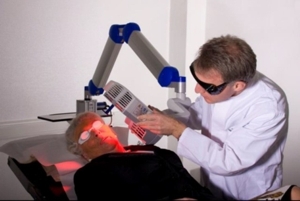
AMELUZ, in combination with photodynamic therapy using BF-RhodoLED ® or RhodoLED ® XL lamp, a narrowband, red light illumination source, is indicated for lesion-directed and field-directed treatment of actinic keratoses of mild-to-moderate severity on the face and scalp. AMELUZ, a porphyrin precursor, in combination with photodynamic therapy using BF-RhodoLED or RhodoLED XL lamp, is indicated for the lesion-directed and field-directed treatment of actinic keratoses of mild-to-moderate severity on the face and scalp .
Save this treatment for later
Sign Up
Not sure about your diagnosis?
Check Your Symptoms
Tired of the same old research?
Check Latest Advances

Related Clinical Trials

Image Guided Surgery Followed by Intraoperative Photodynamic Therapy for Improving Local Tumor Control in Patients With Loco-Regionally Advanced or Recurrent Colorectal Cancer Undergoing Surgery - Phase I/II

Summary: \*As of June 2026- Phase I has been completed and we are now in Phase II. This phase I/II trial studies the side effects and how well fluorescence image guided surgery followed by intraoperative photodynamic therapy for improving local tumor control in patients with colorectal cancer that has spread to nearby tissue or lymph nodes (locally advanced) or that has come back after a period of improvem...

Randomized, Multi-Center, Evaluator-Blind, Vehicle-Controlled Study to Evaluate Efficacy and Safety of Reformulated Levulan Kerastick Plus Photodynamic Therapy (PDT) for Field-Directed Treatment in Patients With Actinic Keratosis (AK) of Face and (Bald) Scalp

Summary: This Phase 3, randomized, multi-center, evaluator-blind, vehicle-controlled study evaluates the efficacy and safety of reformulated Levulan Kerastick (aminolevulinic acid HCl 20%) combined with photodynamic therapy (PDT) for field-directed treatment of actinic keratosis (AK) on the face or bald scalp. Approximately 160 adult patients with 4-8 mild to moderate AK lesions will be randomized into fou...

Randomized, Multi-Center, Evaluator-Blind, Vehicle-Controlled Study to Evaluate Efficacy and Safety of Reformulated Levulan Kerastick Plus Photodynamic Therapy (PDT) for Field-Directed Treatment in Patients With Actinic Keratosis (AK) of Upper Extremities

Summary: This Phase 3, randomized, multi-center, evaluator-blind, vehicle-controlled study evaluates the efficacy and safety of reformulated Levulan Kerastick (aminolevulinic acid HCl 20%) combined with photodynamic therapy (PDT) for field-directed treatment of actinic keratosis (AK) on the upper extremities. Approximately 260 adult patients with 4-8 mild to moderate AK lesions on one arm will be randomize...

Brand Information

    AMELUZ (aminolevulinic acid hydrochloride)
    1INDICATIONS AND USAGE
    AMELUZ, in combination with photodynamic therapy (PDT) using BF-RhodoLED
    2DOSAGE FORMS AND STRENGTHS
    Topical gel: 10% aminolevulinic acid hydrochloride as a white-to-yellowish gel in 2-gram tubes.
    3CONTRAINDICATIONS
    AMELUZ is contraindicated in patients with:
    • Known hypersensitivity to porphyrins.
    • Known hypersensitivity to any of the components of AMELUZ, which includes soybean phosphatidylcholine
    • Porphyria. AMELUZ use may cause uncontrolled phototoxic effects
    • Photodermatoses. PDT may worsen the phototoxic or photoallergic reactions
    4ADVERSE REACTIONS
    The following adverse reactions are discussed in greater detail in other sections of the labeling:
    • Hypersensitivity [see ].
    • Transient Amnestic Episodes [
    • Risk of BF-RhodoLED or RhodoLED XL Lamp Induced Eye Injury
    • Ophthalmic Adverse Reactions [see
    • Increased Photosensitivity
    4.1Clinical Trial Experience
    Because clinical trials are conducted under widely varying conditions, adverse reaction rates observed in the clinical trials of a drug cannot be directly compared to rates in the clinical trials of another drug and may not reflect the rates observed in practice.
    The clinical program for AMELUZ included three double-blind and placebo-controlled phase 3 trials (Trials 1, 2, and 3), enrolling a total of 299 subjects that were treated with narrow band light. Trial subjects were adults greater than or equal to 49 years of age, and the majority had Fitzpatrick skin type I, II, or III. No subjects had Fitzpatrick skin type V or VI. Approximately 86% of subjects were male, and all subjects were White.
    For all three phase 3 trials, the enrolled subjects had mild to moderate AKs (Olsen grade 1 and 2) with 4 to 8 lesions on the face and scalp. Overall, 212 AMELUZ-treated subjects (n=32, n=55, and n=125) and 87 subjects receiving placebo (n=16, n=32, n=39) were illuminated with BF-RhodoLED or similar narrow spectrum lamps. For these trials, the maximal dose was one tube of AMELUZ (2 g) and the size of the application area was up to 20 cm
    Local skin reactions at the application site were observed in about 99.5% of subjects treated with AMELUZ and narrow spectrum lamps. The most frequent adverse reactions during and after PDT were application site erythema, pain, burning, irritation, edema, pruritus, exfoliation, scab, induration, and vesicles.
    Most adverse reactions occurred during illumination or shortly afterwards, were generally of mild or moderate intensity, and lasted for 1 to 4 days in most cases; in some cases, however, they persisted for 1 to 2 weeks or even longer. Severe pain/burning occurred in up to 30% of subjects. In one case, the adverse reactions required interruption or discontinuation of the illumination.
    Table 1 presents the incidence of common (≥1%, <10%) and very common (≥10%) adverse reactions at the application site in randomized, multicenter trials which evaluated a maximal dose of one tube of AMELUZ (2 g) and an application area up to 20 cm
    Common (≥1%, <10%) adverse reactions not at the application site for AMELUZ maximal dose of one tube (2 g) and application area up to 20 cm
    Less common (≥0.1%, <1%) adverse reactions at the application site for AMELUZ maximal dose of one tube (2 g) and application area up to 20 cm
    In a clinical trial designed to investigate the sensitization potential of aminolevulinic acid with 216 healthy subjects, 13 subjects (6%) developed allergic contact dermatitis after continuous exposure for 21 days with doses of aminolevulinic acid that were higher than doses normally used in the treatment of AK.
    In two open label clinical trials to evaluate safety and tolerability, 116 subjects with actinic keratosis (AK) on the face and scalp were treated with three tubes (6 g) of AMELUZ applied to a 60 cm² area. Most adverse reactions observed were consistent with those reported in trials using one tube (2 g) of AMELUZ on a 20 cm² area (see Table 1). Additional reactions which occurred in ≥1% of subjects when three tubes (6 g) of AMELUZ were applied to a 60 cm² area included dry eyes, photosensitivity, and application site discoloration, dryness, papules, and fissures.
    The frequencies of certain adverse reactions at the application site in these trials—exfoliation, itching, scabbing, and erosion—were more than 10% higher with the larger dose (three tubes, 6 g) and treatment area (60 cm²) compared to the frequencies observed in the trials for the smaller dose (one tube, 2 g) and area (20 cm²). Severe application site pain was reported by 41% of the subjects treated with three tubes (6 g) on a 60 cm² area. Most cases were reported during PDT illumination. A total of 15% of subjects discontinued illumination due to adverse reactions.
    4.2Postmarketing Experience
    The following adverse reactions have been reported during post-approval use of AMELUZ. Because these reactions are reported voluntarily from a population of uncertain size, it is not always possible to reliably estimate their frequency or establish a causal relationship to drug exposure.
    Skin and subcutaneous tissue disorders: allergic dermatitis, application site inflammation, application site discoloration.
    Eye disorders: eye irritation, diplopia, ocular hyperemia, photophobia, and blurred vision.
    General disorders and administration site conditions: fatigue.
    Immune System disorders: hypersensitivity.
    Nervous system disorders: dysaesthesia, transient amnestic episodes.
    5DRUG INTERACTIONS
    There have been no formal studies of the interaction of AMELUZ with other drugs. It is possible that concomitant use of other known photosensitizing agents such as St. John’s wort, griseofulvin, thiazide diuretics, sulfonylureas, phenothiazines, sulphonamides, quinolones and tetracyclines may enhance the phototoxic reaction to PDT
    6DESCRIPTION
    AMELUZ (aminolevulinic acid hydrochloride) topical gel, 10% is a non-sterile white-to-yellowish gel. The gel formulation contains a nanoemulsion.
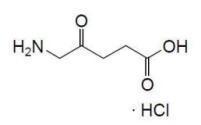
    Aminolevulinic acid, a porphyrin precursor, is a white to off-white crystalline solid. It is readily soluble in water, methanol, and dimethylformamide. Its chemical name is 5-amino-4-oxo-pentanoic acid hydrochloride, molecular weight is 167.59 and molecular formula is C
    ALA.HCl - Structural Formula
    Each gram of AMELUZ contains 100 mg of aminolevulinic acid hydrochloride (equivalent to 78 mg aminolevulinic acid) as the active ingredient and the following inactive ingredients: xanthan gum, soybean phosphatidylcholine, polysorbate 80, medium-chain triglycerides, isopropyl alcohol, dibasic sodium phosphate, monobasic sodium phosphate, sodium benzoate and purified water.
    7CLINICAL STUDIES
    The efficacy and safety of AMELUZ in combination with PDT using a narrow spectrum (red light lamp) source were evaluated in three randomized, multicenter trials (Trials 1, 2, and 3). Trials 2 and 3 were vehicle-controlled and double-blind. Trial 1 was double-blind with respect to vehicle and observer-blind regarding the active comparator arm. All clinical trials included a follow-up assessment after 6 and 12 months.
    In these trials, 212 subjects with 4 to 8 mild to moderate AK lesions on the face/forehead and/or bald scalp were treated with up to one tube (2 grams) of AMELUZ on an application area up to 20 cm² and a narrow band spectrum lamp. Subjects ranged from 49 to 87 years of age (mean 71 years), and 92% had Fitzpatrick skin type I, II, or III. No subjects had Fitzpatrick skin type V or VI. Approximately 86% of subjects were male, and all subjects were White.
    All sessions were comprised of lesion preparation to roughen the surface and remove crusts, application of AMELUZ with occlusion for 3 hours, and removal of the residual gel. Subsequently, the entire treatment area was illuminated with a narrow spectrum red light source, a lamp of either 630 nm or 633 nm and a light dose of approximately 37 J/cm
    In all trials, the lesions that were not completely cleared 12 weeks after the initial treatment were treated a second time with an identical regimen. In the trials, 42% (88/212) of subjects needed a second treatment.
    The primary endpoint for all trials was complete clearance 12 weeks after the last PDT. The results of Trials 1, 2 and 3 are presented in Table 2.
    Subjects who achieved complete clearance at 12 weeks after the last PDT entered a 12-month follow-up period. In the three trials, subjects who received AMELUZ with the narrowband PDT and achieved complete clearance 12 weeks after the last PDT had recurrence rates of 14%, 11%, and 25%, respectively (at 6 months) and 40%, 22%, and 37%, respectively (at 12 months).
    Recurrence was defined as the percentage of subjects with at least one recurrent lesion during the 6-month or 12-month follow-up period in subjects with completely cleared lesions 12 weeks after the last PDT.
    8HOW SUPPLIED/STORAGE AND HANDLING
    AMELUZ (aminolevulinic acid hydrochloride) topical gel, 10% is a white-to-yellowish gel. The drug product is supplied in an aluminum tube with a white, high density polyethylene (HDPE) screw cap. Each tube contains 2 g of gel.
    NDC 70621-101-01 2 g tube
    NDC 70621-101-10 Cardbox containing one 2 g tube
    NDC 70621-101-20 Cardbox containing ten 2 g tubes
    Store AMELUZ in a refrigerator, 2°C – 8°C (36°F – 46°F). Excursions permitted to 15°C – 30°C (59°F – 86°F).
    After opening, AMELUZ can be stored for up to 12 weeks in a refrigerator at 2°C – 8°C (36°F – 46°F) if the tube is tightly closed.
    9INSTRUCTION FOR USE
    User Manual
    Manufacturer: Biofrontera Pharma GmbH
    Distributor: Biofrontera Inc.


    Foreword
    Thank you for choosing the BF-RhodoLED
    Thorough reading and use of both this user manual and the Ameluz
    Our combination Ameluz
    For further questions about Ameluz
    Warranty and Disclaimers
    Please see the terms and conditions of your contract for this information.
    Manufacturer
    Biofrontera Pharma GmbH, Hemmelrather Weg 201, 51377 Leverkusen, Germany
    "AMELUZ, RHODOLED and BF-RhodoLED are registered trademarks of Biofrontera Pharma GmbH.
    1 Intended Use
    BF-RhodoLED

    2 BF-RhodoLED
    BF-RhodoLED

    3 Warnings and Precautions
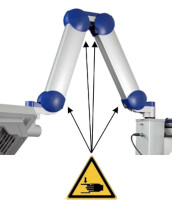
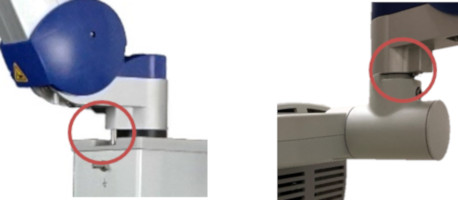
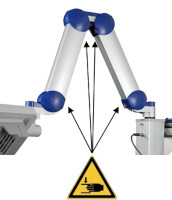
    Figure 01
    Figure 1: The scissor arm in parked position. Arrows indicate potential points where fingers can get trapped. (The appearance of devices from batches 001 to 003 slightly differs. Appearance and location of the labels remain unaltered).
    4 BF-RhodoLED
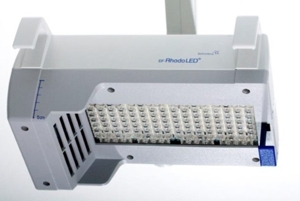
    4.1 Light Emitting Diodes (LEDs)
    The light-field of the BF-RhodoLED
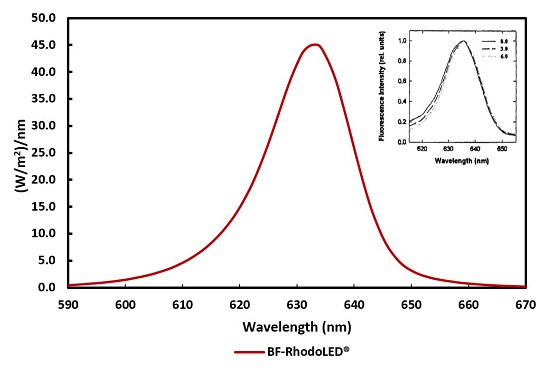
    Figure 02
    Figure 2: Typical emission spectrum of the LEDs of the BF-RhodoLED®. Insert: Fluorescence excitation spectrum of PPIX in cells 0, 3 and 6 mm below the tissue surface (Moan et al., 1996)
    The BF-RhodoLED
    • Illumination time of 10 minutes
    • Treatment distance of 5-8 cm (Optimum 6 cm)
    The illumination area of the LED lamp is 8 x 18 cm. As the intensity decreases towards the edge of this area, the effective treatment area is reduced to 6 x 16 cm.

    4.2 Lamp Components
    The BF-RhodoLED
    • Lamp head with holding bracket
    • Scissor arm
    • Storage shelf with control unit (touchscreen monitor)
    • Mobile frame and lamp base (include support rail, castors and power supply)
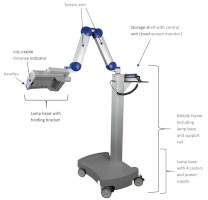
    Figure 03
    Figure 3: BF-RhodoLED® main components. (The appearance of devices from batches 001 to 003 slightly differs.)
    The swivel range to the left and right of the vertical rail is +/- 24°. The lamp head can be adjusted horizontally and vertically and tilted sideways. The scissor arm with internal gas springs allows seamless adjustment of the lamp head to any position.
    In order to avoid eye irritation, glare or injury, protective eye equipment must be used by patient, healthcare providers and any person present during the illumination period. Do not stare into the light source! The operator and other persons present must wear protective glasses with a visible light transmission (VLT) of approximately 10%. The patient must wear eye protection such as disposable eye protection pads or eye caps with an optical density for visible light of 6 or higher. Both options are effective and comfortable for use during treatment.


    6 BF-RhodoLED
    These instructions should be used in conjunction with detailed operating instructions below (chapter 7). The section titles and numbers listed next to the instruction refer to the detailed instructions and/or descriptions that correspond with each step.

    7 Detailed Operating Instructions
    Note: Every user of the BF-RhodoLED® has to be trained in operating the device. The initial training is provided by Biofrontera during set-up of the BF-RhodoLED®. Recurrent training is not mandatory but can be provided by Biofrontera employees. The device must be protected against unauthorized use.

    7.1 Transport of the lamp
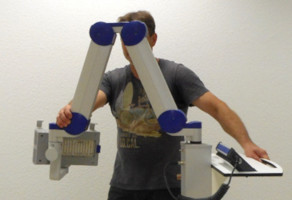
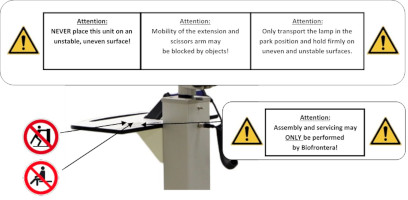
    The transportation of the lamp shall be done when the scissor arm is completely folded. During transportation one hand shall hold on to the support rail or storage shelf while the other hand holds the scissor arm (
    Figure 04
    Figure 4: Transport of the lamp. (The appearance of devices from batches 001 to 003 slightly differs.)
    7.2 Movement area of the scissor arm and the lamp head
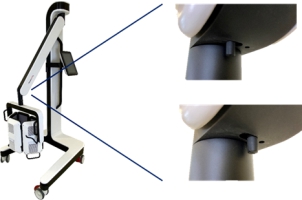
    The scissor arm has a swivel range of +/- 24 degrees to the left and right. The swivel range is limited by a pin at the connection between scissor arm/ support rail and scissor arm/ lamp head (
    Figure 05
    Figure 5: Limiting pins of the scissor arm and the lamp head. (The appearance of devices from batches 001 to 003 slightly differs. Appearance and location of the labels remain unaltered.)
    7.3 Turning the Lamp On or Off
    Note: Before turning on the lamp, the power cord must be plugged in. After connecting, the lamp can be turned on and used following the instructions below.
    The on-off switch is located on the left side of the touchscreen monitor, close to its spiral cord. With the lamp plugged in, press the button to start the device.

    Important: This push button can also be used to turn the lamp off. Switching off the lamp can also be done by pressing the switch off Icon 02 button on the touchscreen (see chapter 7.4.2 "Home Screen").
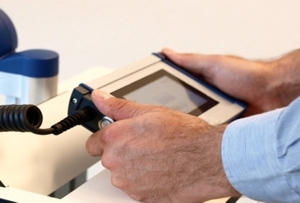
    Figure 06
    Figure 6: Touchscreen monitor
    Note: The blue LED of the push button indicates that the device is in stand-by mode.

    7.4 Touchscreen Monitor and Menu
    When using the touchscreen, please firmly press the center of the buttons shown on the screen to ensure it is read correctly by the software. Do not press too quickly, the input may not be read by the software. The touchscreen can be used while wearing commercially available examination gloves.

    7.4.1 Start Screen
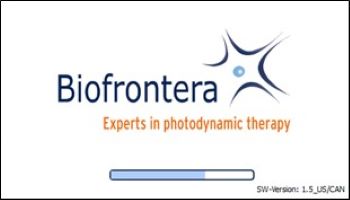
    The Biofrontera corporate logo and software version are displayed during the LED lamp operating system start-up (
    Figure 07
    Figure 7: Start screen

    7.4.2 Home Screen
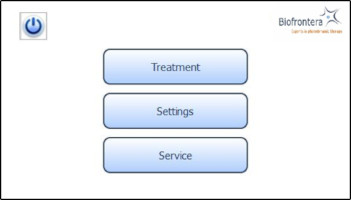
    The home screen appears after the operating system has loaded. From the home screen you can select "Treatment", "Settings" or "Service" (
    Figure 08
    Figure 8: Home screen

    7.5 Conducting a Treatment
    Prior to treating a patient with Ameluz please ensure that BF-RhodoLED

    7.5.1 Distance Indicator
    Position the lamp head over the skin area to be treated at a distance of 5-8 cm. Use the adjustable distance indicator and graduated scale bar to help measure and aid in achieving the correct distance (
    Figure 09aFigure 09b
    Figure 9: Positioning of the lamp head to the treated skin area
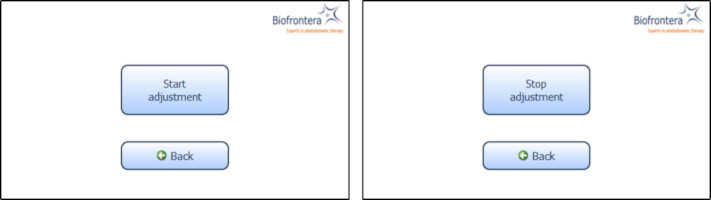
    7.5.2 Adjustment Light
    To further aid positioning, use the adjustment light. On the touchscreen, press the following buttons in sequence (starting in the home screen): "Treatment" (
    Figure 10
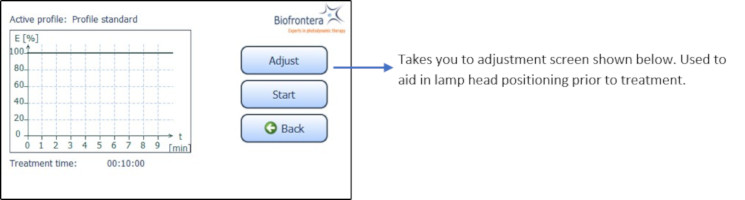
    Figure 10: Treatment menu
    Figure 11
    Figure 11: Start and Stop adjustment

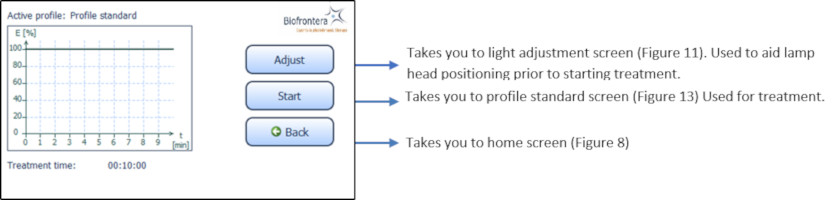
    7.5.3 Treatment Menu
    Press treatment to enter the treatment menu (
    Figure 12
    Figure 12: Treatment menu
    In the treatment menu (

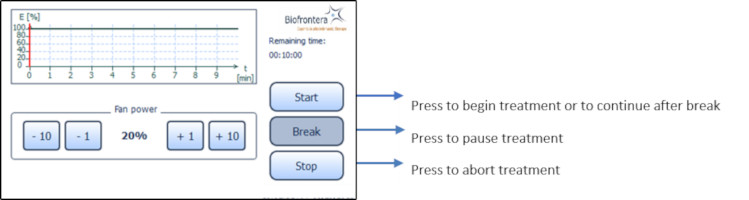
    7.5.4 Profile Standard Menu
    In the profile screen menu, press "Start" to begin treatment (
    After pressing "Stop" or upon completion of the full 10 minute treatment the software will automatically return you to the treatment menu.
    The remaining treatment time is displayed to the right of the graph and the red vertical line within the graph indicates the time that has elapsed.
    Figure 13
    Figure 13: Profile standard
    7.5.5 Audio Signals during Treatment
    During treatment the patient will hear audio signals, 1 beep indicating 25 %, 2 beeps indicating 50 % and 3 beeps indicating 75 % of the PDT is completed, and upon treatment completion the lamp will stop the illumination and 4 beeps will be heard (see also chapter 7.6.2).
    7.5.6 Patient fan
    You can control the speed of the patient fan both before and during treatment with the plus and minus buttons, in increments of 1 % or 10 %. The patient fan continues to run when the treatment is paused ("Break"). The fan can be stopped by pressing "Stop" but be aware the treatment will also be aborted and any elapsed treatment time will not be saved.
    The settings menu is invoked (
    Figure 14
    Figure 14: Settings menu
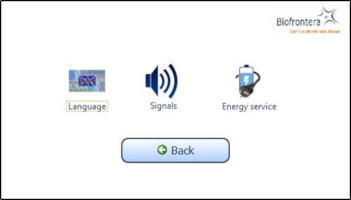
    You can configure the following parameters in this menu:
    • Language
    • Signals
    • Energy service (Power management)
    Switch back to the home screen menu via the "Back" button.

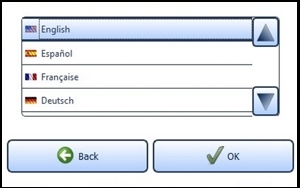
    7.6.1 Language Settings
    Select a language by tapping on the desired language. Use the arrow keys to scroll through the list. Confirm the selected language with the "OK" button (
    Figure 15
    Figure 15: Language setting

    7.6.2 Sound Settings
    Activate and deactivate the audio signals for typing, warnings and sounds during the treatment. To do this, select the desired fields. A check mark means the sound is on.

    Important Note: Warning sounds will be emitted if an error occurs during operation of the lamp.
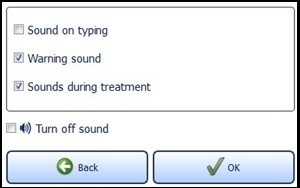
    Figure 18
    Figure 16: Sound setting
    7.6.3 Energy Service (Power Management)
    Providing the standby function is not manually deactivated via the check box "Never turn off lamp automatically" located near the bottom of the screen, the lamp will turn off after 10 minutes of non-use (
    Figure 19
    Figure 17: Energy management

    If the configured time expires, a request appears for 10 seconds asking if you wish to prevent shut down. The LED lamp turns off automatically afterwards.

    7.7 Service Menu
    Authorization is required to access the service menu. Only authorized personnel can access the service menu.
    The BF-RhodoLED
    If your LED lamp no longer functions properly for some unknown reason, proceed as follows:
    • Unplug the power supply for half a minute and then plug back into the outlet (This action prompts a software reboot).
    • Turn the lamp back on using the touchscreen monitor and verify functionality.
    Should the problem persist, please contact your sales representative or Biofrontera. The lamp may not be used until the problem has been rectified.
    For all other malfunctions and difficulties with operation please contact your sales representative or Biofrontera. You will find the contact details on page 2.

    9 Servicing
    Servicing may only be performed by Biofrontera-authorized personnel. If servicing is done by third parties, BF-RhodoLED

    During service, the gas springs (gas pressure springs and gas traction springs) in the scissor arm as well as the general safety condition of the BF-RhodoLED® are checked.

    Contact your sales representative or Biofrontera to schedule all service appointments.

    10 Maintenance and Cleaning
    The device may under no circumstances be cleaned with aggressive cleaning agents or solvents (e.g. acetone or highly concentrated ethanol), as these promote wear and tear of the surface (paint coating), safety signs and graduated scale bar as well as the logo. Please avoid allowing any penetration of liquids into the lamp, BF-RhodoLED
    Always unplug the lamp prior to cleaning and please observe the following cleaning practices:
    11 Disposal Instructions
    Follow all local and governmental disposal laws and regulations when disposing of the BF-RhodoLED

    12 Technical Data
    12.1 Electrical connectors
    Power supply unit:
    • Primary wide-range input 100-240 VAC
    • Secondary safety extra-low voltage output 48 VDC
    • Secondary standby voltage output 5 VDC
    Mother board for voltage management and control:
    • Supply voltage input 48 VDC
    • Standby voltage input 5 VDC plus Standby contact
    • RS485 interface
    • Output supply voltage HMI board 24 VDC
    • 4 x ports LED board 8-pin (2 x LED circuits, temperature (3-pin))
    • 4 x connector ventilator (2-pin)
    LED board:
    • 2 x ports mother board 8-pin (2 x LED circuits, temperature (3-pin))
    Human Machine Interface (HMI) for operation:
    • Supply voltage input 24 VDC
    • RS485 interface
    12.2 Specification
    For further information please directly contact Biofrontera.
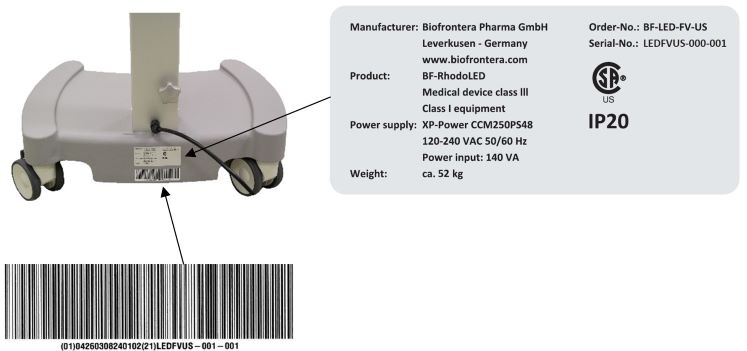
    13.1 Labeling on the Lamp
    The product sticker is located on the reverse side of the lamp base (see
    Figure 20
    Figure 18: Product and UDI label. (The appearance of devices from batches 001 to 003 slightly differs. Appearance and location of the labels remain unaltered.)
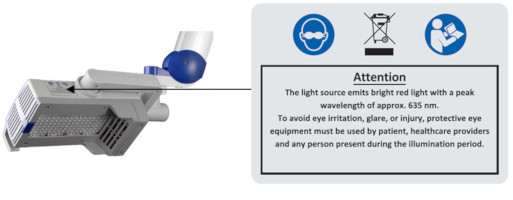
    Labels with safety instructions, special disposal instructions and further instructions are represented in the following figures.
    Figure 21
    Figure 19: Instructions and notes on the lamp head
    Figure 22
    Figure 20: Instructions on the storage shelf. (The appearance of devices from batches 001 to 003 slightly differs. Appearance and location of the labels remain unaltered.)
    Figure 23
    Figure 21: Instructions on the scissors arm. (The appearance of devices from batches 001 to 003 slightly differs. Appearance and location of the labels remain unaltered.)
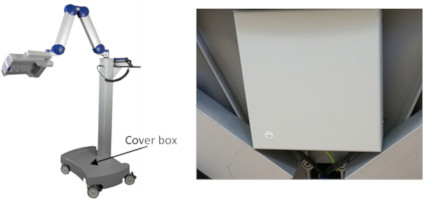
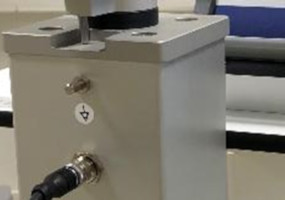
    Instructions for existing ground connector connections (see
    • Next to the grounding screws, which are located within and next to the power supply cover box beneath the mobile castor, respectively
    • On the power supply cover box (see
    Figure 24
    Figure 22: Instructions for ground connector connection
    Figure 25
    Figure 23: BF-RhodoLED®. (The appearance of devices from batches 001 to 003 slightly differs. Appearance and location of the labels remain unaltered.)
    Instructions on the existing potential compensator conductor is located on the carrier bar beneath the potential compensator conductor (see
    Figure 26
    Figure 24: Potential compensator conductor. (The appearance of devices from batches 001 to 003 slightly differs. Appearance and location of the labels remain unaltered.)
    All depicted symbols are summarized in a table in section 13.2 "Explanation of symbols".
    13.2 Description of Symbols

    13.3 Labeling on the Packaging
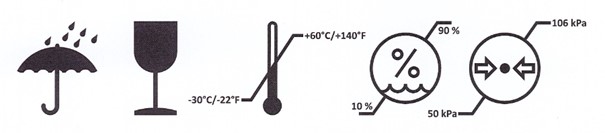
    • Attention: Protect from moisture and keep dry!
    • Attention: Do not throw the package, damage possible!
    • Attention: Please transport and store at -30°C/ -22°F to +60°C/ 140°F, a relative humidity of 10 % to 90 % and at an atmospheric pressure of 500 hPa (50 kPa) - 1060 hPa (106 kPa).

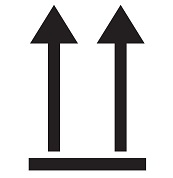
    Symbol 11
    • This side up!
    Symbol 12
    • Caution, one end of the package is heavy
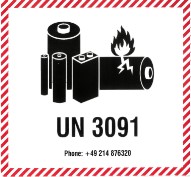
    Symbol 13
    • Contains a lithium metal battery (optionally, not required starting from batch 007)
    Symbol 14
    14 Electromagnetic compatibility (EMC)
    BF-RhodoLED
    Version 2.7
    10INSTRUCTION FOR USE
    Figure 00
    User Manual
    Manufacturer: Biofrontera Pharma GmbH
    Distributor: Biofrontera Inc.

    Foreword
    Thank you for choosing the RhodoLED

    Our drug Ameluz® and medical device RhodoLED® XL have been approved in combination for photodynamic therapy; the only approved use of our lamp is in combination with Ameluz® gel. This user manual provides important RhodoLED® XL product details, precautions and warnings, and operating instructions. For Ameluz®, please use its US prescribing information. The Ameluz® prescribing information includes information on how to use the gel along with contraindications, warnings and precautions and dosage and administration.
    Thorough reading and use of both this user manual and the Ameluz

    Our combination Ameluz
    For further questions about Ameluz
    Warranty and Disclaimers
    Please see the terms and conditions of your contract for this information.
    Manufacturer
    Biofrontera Pharma GmbH, Hemmelrather Weg 201, 51377 Leverkusen, Germany
    "AMELUZ and RHODOLED are registered trademarks of Biofrontera Pharma GmbH.
    1 Intended Use
    RhodoLED

    2 RhodoLED
    RhodoLED

    3 Warnings and Precautions
    4 RhodoLED
    4.1 Light emitting diodes (LED)
    RhodoLED
    Figure 01
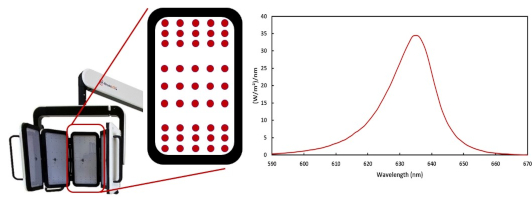
    Figure 1: LED panels with LED distribution and emission spectrum of RhodoLED® XL LEDs.
    The RhodoLED
    - Illumination time of 13.5 minutes
    - Treatment distance of 4.9 ± 0.6 inch (12.5 cm ± 1.5 cm)
    The illumination area of the LED lamp is 9.06 x 11.42 inch (23 cm x 29 cm) for all panels in a curved shape.
    The LEDs are distributed on each panel in a specific way (see Figure 1), such that they are more densely packed towards the upper and lower edges than in the center region of each panel. This distribution optimizes the homogeneity of illumination over the treated skin.

    4.2 RhodoLED
    The RhodoLED
    • Lamp head with telescope suspension
    • Spring arm
    • Control unit
    • Mobile base (includes support rail, castors and power supply)
    Figure 2: RhodoLED® XL main components
    5 Operating environment of RhodoLED

    RhodoLED® XL shall be operated in environments of professional health care facilities. For a detailed description in electromagnetic compatibility see chapter 15. RhodoLED® XL is intended for operation in non-residential facilities and such like that are connected directly to a public low-voltage supply network that also supplies residential buildings.


    6 Eye Protection
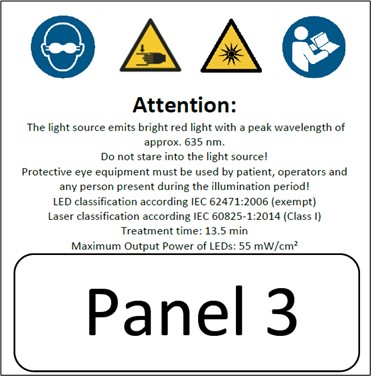
    Protective eye wear must be used by patient, healthcare providers and any persons present during the illumination period. Do not stare into the LED beam. RhodoLED

    Note: Eyewear is not part of the medical device. Please carefully read any accompanying usage information before using any eye protection.

    7 RhodoLED
    These instructions should be used in conjunction with detailed operating instructions below (chapter 8). The section titles and numbers listed next to the instruction refer to the detailed instructions that correspond with each step.

    Note: Every user of the RhodoLED® XL must be trained in operating the device. The initial training is provided by Biofrontera during set-up of the RhodoLED® XL. Recurrent training is not mandatory but can be provided by Biofrontera employees or other authorized parties. Before treating a patient with Ameluz®, please ensure that RhodoLED® XL is in good working order.

    8 Detailed Operating Instructions
    Note: Every user of the RhodoLED® XL must be trained in operating the device. The initial training is provided by Biofrontera during set-up of the RhodoLED® XL. Recurrent training is not mandatory but can be provided by Biofrontera employees. The device must be protected against unauthorized use.

    8.1 Transport of RhodoLED
    During transportation the RhodoLED

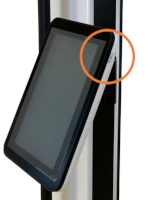
    For transport, please ensure that the control unit of RhodoLED® XL is placed on the left side (see Figure 3).
    Figure 03
    Figure 3: Transport position of RhodoLED® XL and locking function of spring arm. Locking function is located at the bottom of the spring arm, close to the lamp head connection.
    8.2 Movement Areas
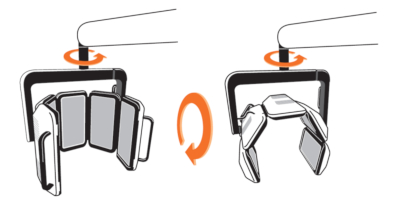
    The swivel range of the spring arm to the left and right of the main axis is +/- 5°. The vertical range of the spring arm is 68°. The spring arm with internal gas spring allows seamless adjustment to any height. The lamp head can be rotated by 360° (Figure 4). In addition, the panels can be tilted up to 90° at the holding bracket (Figure 4).
    Note: If the spring arm is at the top, it may collide with the LED panels when they are rotated 360°.
    Figure 04
    Figure 4: Rotation and tilting of the lamp head.
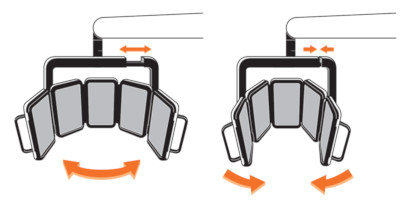
    The orientation of the panels can be changed from a curved shape to an unfolded form by pulling the holding bracket apart (Figure 5).
    Figure 05
    Figure 5: Movement range of the lamp head.
    Note: The RhodoLED® XL LED panels should only be used in curved shape and not in a fully unfolded form. This is necessary to ensure the application of 37 J/cm² during the illumination.
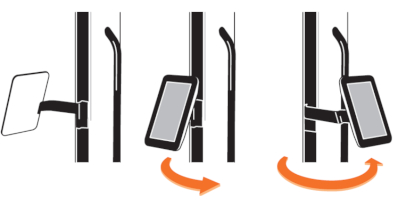
    The control unit can be turned from the left to the right side of the device (see Figure 6). The control unit must be brought completely into the selected position until it snaps into place.

    Note: If the control unit is not snapped into position, there may be a collision between the spring arm and the control unit.
    Figure 06
    Figure 6: Control unit positions
    8.3 Turning RhodoLED
    Note: Before turning on the lamp, the power cord must be plugged in into the power grid. RhodoLED® XL is intended for operation in non-residential facilities and such like that are connected directly to a public low-voltage supply network that also supplies residential buildings.

    Note: Do not place the device in such a way that it is difficult to disconnect the device's power plug from the mains during operation.

    The RhodoLED® XL is equipped with a cable winding system. To unwind the cable, pull the plug out of the opening of the lamp base. When the cable is being unwound, a clicking sound is heard. The power button is located on the right side of the control unit. With the lamp plugged in, press the power button to start the device.

    To power down the device, press the power button and the device shuts down. RhodoLED® XL can also be switched off via the software. To switch the device off, press the software power button in the upper right corner. To rewind the cable, remove the plug from the wall socket and slightly pull on the cable once. Hold the cable loosely in your hand to allow rewinding. The cable winder will pull the cable in automatically until it is fully rolled up. Do not completely release the cable when winding it up to avoid damage of the device.
    Figure 07
    Figure 7: Control unit of RhodoLED® XL with power button

    8.4 RhodoLED
    8.4.1 Control Unit
    The touchscreen of the control unit can be used while wearing commercially available examination gloves.
    8.4.2 Splash Screen
    The Biofrontera corporate logo and software version are displayed during the LED lamp operating system start-up (Figure 8). The operating system takes approximately 10 seconds to load.
    Figure 08
    Figure 8: Splash screen

    8.4.3 Home Screen
    The home screen appears after the operating system has loaded.
    Figure 09
    Figure 9: Home screen
    8.4.4 The Treatment Profile
    The RhodoLED
    8.4.5 Selecting Active LED Panels
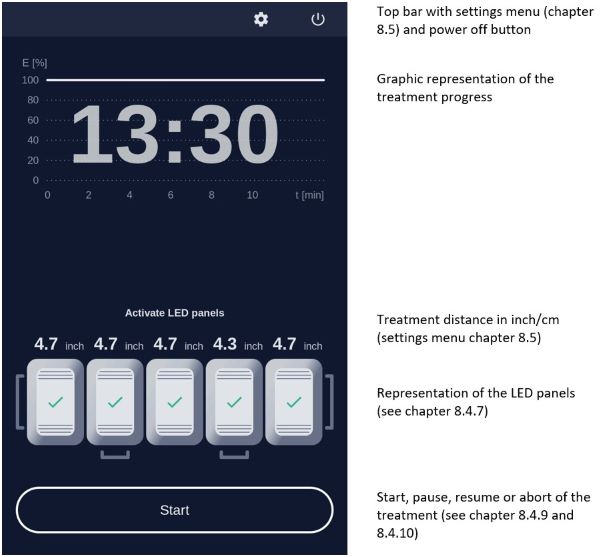
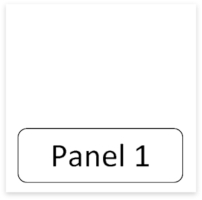
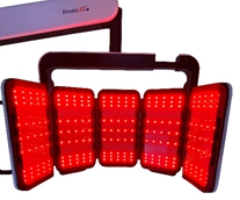
    The device has 5 LED panels which are also displayed by the software (Figure 10). The illustrated panels are visible from the back side and the corresponding panel of the device can be identified via the handles, starting from the left. All panels are activated by default and can be deactivated via the software. To deactivate LED panels, press on the illustrated panel. For easier orientation, the panel number can also be found at the backside of the respective panel (Figure 11).
    Figure 10
    Figure 10: Software illustration of RhodoLED® XL LED panels (all panels are activated)
    Figure 11
    Figure 11: Panel number at the backside of the panel
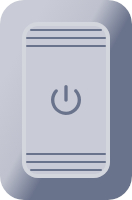
    Deactivated panels are displayed in grey with a power symbol in their centers (Figure 12). Activated panels are highlighted and the current distance to the treatment area is displayed.
    Figure 12
    Figure 12: Coloring of a switched off panel

    8.4.6 Treatment Area
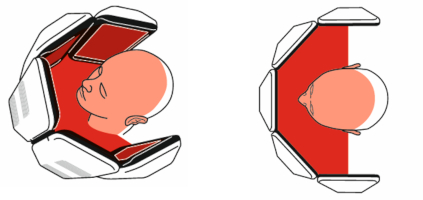
    The illumination area of RhodoLED
    Note: The RhodoLED® XL LED panels should only be used in curved shape and not in fully unfolded form. This is necessary to ensure the application of 37 J/cm² during the illumination.
    Figure 13
    Figure 13: Treatment area of RhodoLED® XL from the side and in top view.
    Note: If less than 5 panels are used for a treatment, it must be ensured that at least three adjacent panels are used. The treatment area is thereby reduced and reaches from the midline of the one outer panel to the other midline of the other outer panel.

    If a treatment with less than 5 active LED panels is started, a message dialog appears which must be confirmed.
    8.4.7 Adjusting the Treatment Distance
    The correct treatment distance for the RhodoLED
    Note: When starting the treatment, the LED panels that are too close or too far away from the treatment area will nevertheless also light up. To disable an LED panel during the treatment it must be switched off on the display (see Figure 12).
    Table 1: Adjusting the treatment distance
    8.4.8 Adjustment Light
    If the correct treatment distance of 4.9 inch (12.5 cm) is set the LEDs of the panel light up at a low light intensity to allow an easy adjustment of the distance and the target treatment area.

    The size of the treatment area is 9.06 x 11.42 inch (23 cm x 29 cm) for all panels in a curved shape.

    Note: When starting the treatment, the LED panels that are too close or too far away from the treatment area will nevertheless also light up. To disable an LED panel during the treatment it must be switched off on the display (see Figure 12).
    Figure 14
    Figure 14: Low light intensity for correct adjustment of LED panels.
    8.4.9 Starting an Illumination
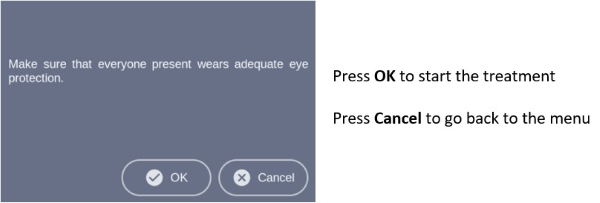
    To start a treatment, press the
    Figure 15
    Figure 15: Note on eye protection before starting treatment.
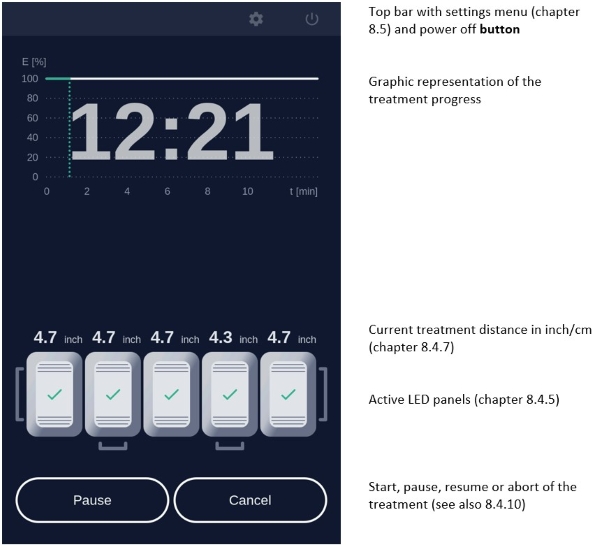
    During the illumination, the remaining treatment time is displayed in the diagram. The progress is marked green in the profile and with a green dotted vertical line (Figure 16).
    Figure 16
    Figure 16: Treatment progress.
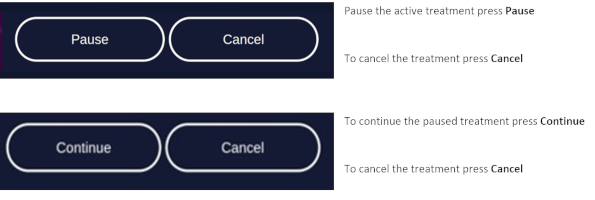
    8.4.10 Pause, continue, or cancel a treatment
    Figure 17
    Figure 17: Pause, continue, and cancel a treatment.

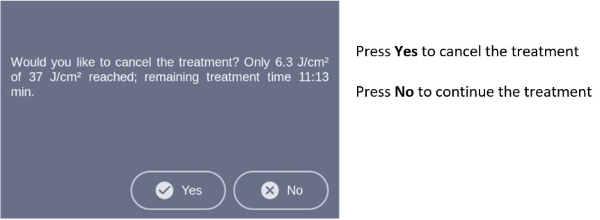
    To abort the current treatment, press the Cancel button. The applied light dose and the remaining treatment time is displayed in a query. Confirm the query to cancel the treatment (Figure 18).
    Figure 18
    Figure 18: Cancelled treatment message shows applied light dose and remaining treatment time.
    Note: If you cancel prior to the end of the total treatment time, the internal timer will reset. The remaining treatment time will not be saved.
    After pressing
    8.4.11 Audio Signals After Treatment

    After completion of the treatment a signal occurs, and the lamp will stop the illumination. Audio signals can be deactivated via the settings menu (see chapter 8.5.4).

    Further audio signals occur for queries that must be confirmed and may occur in the event of an error. A description of possible errors can be found in chapter 9.


    8.5 Settings Menu
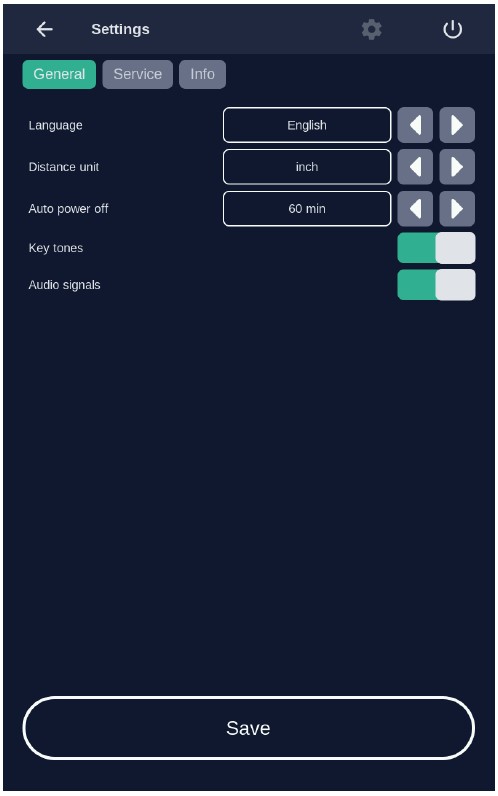
    The settings menu is organized in the tabs
    Figure 19
    Figure 19: The settings menu is organized in the three main tabs General, Service and Info

    8.5.1 Language
    Language settings are part of the
    Confirm the selected language by pressing the

    8.5.2 Distance Units
    Unit settings are part of the

    Confirm the selected distance unit by pressing the Save button, to discard the settings leave the menu without pressing Save.
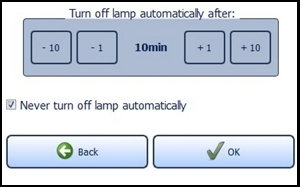
    8.5.3 Auto power off
    Auto power off settings are part of the

    Confirm your selected auto power off time by pressing Save, to discard the settings leave the menu without pressing Save.
    8.5.4 Sound Settings
    Sound settings are part of the

    Confirm your selection by pressing Save, to discard the settings leave the menu without pressing Save.

    Note: Warning sounds will be emitted if an error occurs during operation of the lamp. Warning sounds cannot be turned off.
    8.5.5 Info-Tab
    The system status provides information about the current hardware and software status of the device.
    This includes information about:

    • The serial numbers of the systems core components
    • Automatic switch off settings
    • Software version
    • List of occurred errors (chapter 9)

    Note: In case of a malfunction of the device, please have this information available.

    8.5.6 Service Menu

    9 Error Messages
    The RhodoLED
    Note: even if usage of the lamp is still possible in case of an error, please contact your local sales representative or Biofrontera if an error message persists.
    If your RhodoLED
    • Unplug the power supply for half a minute and then plug back into the outlet (This action prompts a software reboot).
    • Turn the lamp back on using the control unit and verify functionality.
    Should the problem persist, please contact your sales representative or Biofrontera. The lamp may not be used until the problem has been rectified.
    For all other malfunctions and difficulties with operation please contact your sales representative or Biofrontera. You will find the contact details on page 2 of the manual.
    Please have the system status (chapter 8.5.5) available if you contact your sales representative or Biofrontera.

    10 Servicing and repairs
    Servicing and repairs may only be performed by Biofrontera-authorized personnel. For RhodoLED

    Device is not serviced while in use with patients.

    If servicing or repairs are done by third parties, RhodoLED® XL warranty is void and Biofrontera cannot be held responsible for potential malfunctions of or damages to the device or the patients.
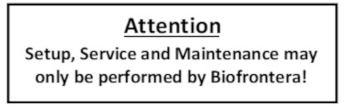
    Figure 20
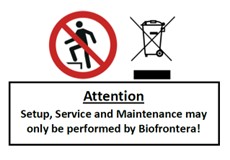
    Figure 20: Servicing and maintenance may only be performed by Biofrontera

    11 Maintenance and Cleaning
    The device may under no circumstances be cleaned with aggressive cleaning agents or solvents (e.g. acetone or highly concentrated ethanol), as these promote wear and tear of the surface (paint coating) and labeling. Please use only a damp cloth when wiping over the labels.
    Please avoid allowing any penetration of liquids into the lamp, RhodoLED
    Always unplug the lamp prior to cleaning and please observe the following cleaning practices:
    12 Disposal Instructions
    Follow all local and governmental disposal laws and regulations when disposing of the RhodoLED

    13 Technical Data
    13.1 Electrical Connectors
    Power supply unit:
    • Primary wide-range input 100-120 VAC
    • Secondary safety extra-low voltage output 48 VDC
    • Secondary standby voltage output 5 VDC
    LED controller board:
    • Supply voltage input 48 VDC
    • 2x CAN interface (2 pin)
    • LED board FFC (12 pin)
    • Distance sensor FFC (4 pin)
    • 2 x connector ventilator (3 pin)
    LED board:
    • LED controller board FFC 12 pin (3 x LED circuits, temperature)
    • Distance sensor FFC (4 pin)
    Human Machine Interface (HMI) for operation:
    • Supply voltage input 48 VDC (2 pin)
    • Secondary standby voltage input 5 VDC (4 pin)
    • CAN interface (3 pin)
    • USB interface (5 pin, covered)
    • Speaker (2 pin)
    • Touch controller (4 pin)
    • Display data LVDS (40 pin)
    • On/off switch (2 pin)
    • HMI module to pillar external connector (10 pin)
    • Grounding (1 pin)
    13.2 Specification
    For further information please directly contact Biofrontera.
    14.1 Label on the Lamp Base
    Figure 21
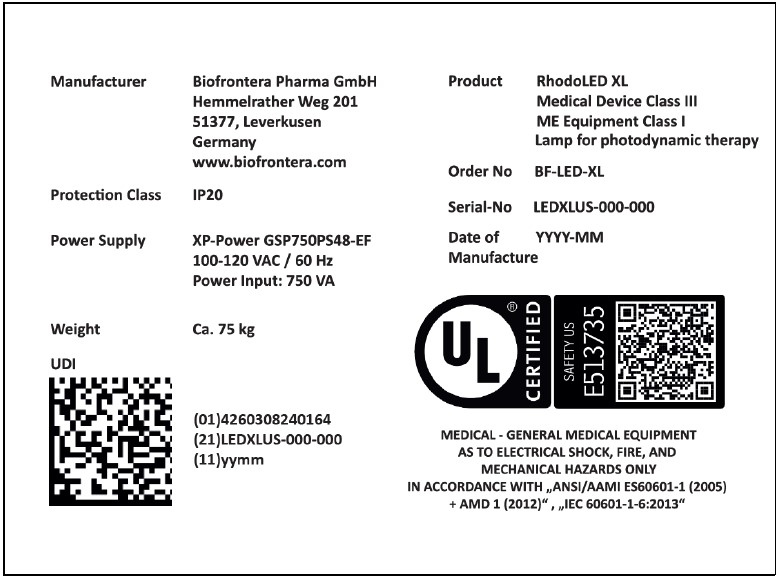
    Figure 21: Product label (serial number and date of manufacturing vary) with UDI code of RhodoLED® XL on lamp base, individual code depends on the serial number and date of manufacturing of the device.
    Figure 22
    Figure 22: No stepping on the device, no disposal in household waste, information on setup and service.
    Figure 23
    Figure 23: Instruction for ground connector connection (not visible from the outside)
    14.2 Label on LED Panels
    Figure 24
    Figure 24: Instruction and notes on the LED panels
    Figure 25
    Figure 25: LED Panel numbering from Panel 1 to Panel 5
    14.3 Description of Symbols

    15 Electromagnetic compatibility
    RhodoLED
    The use of accessories, transducers and cables other than those specified or provided by the manufacturer may result in increased electromagnetic emissions or reduced electromagnetic immunity of the equipment and may lead to incorrect operation. Assembly, service and repairs may only be performed by Biofrontera.
    Version 1.9 SW_G2
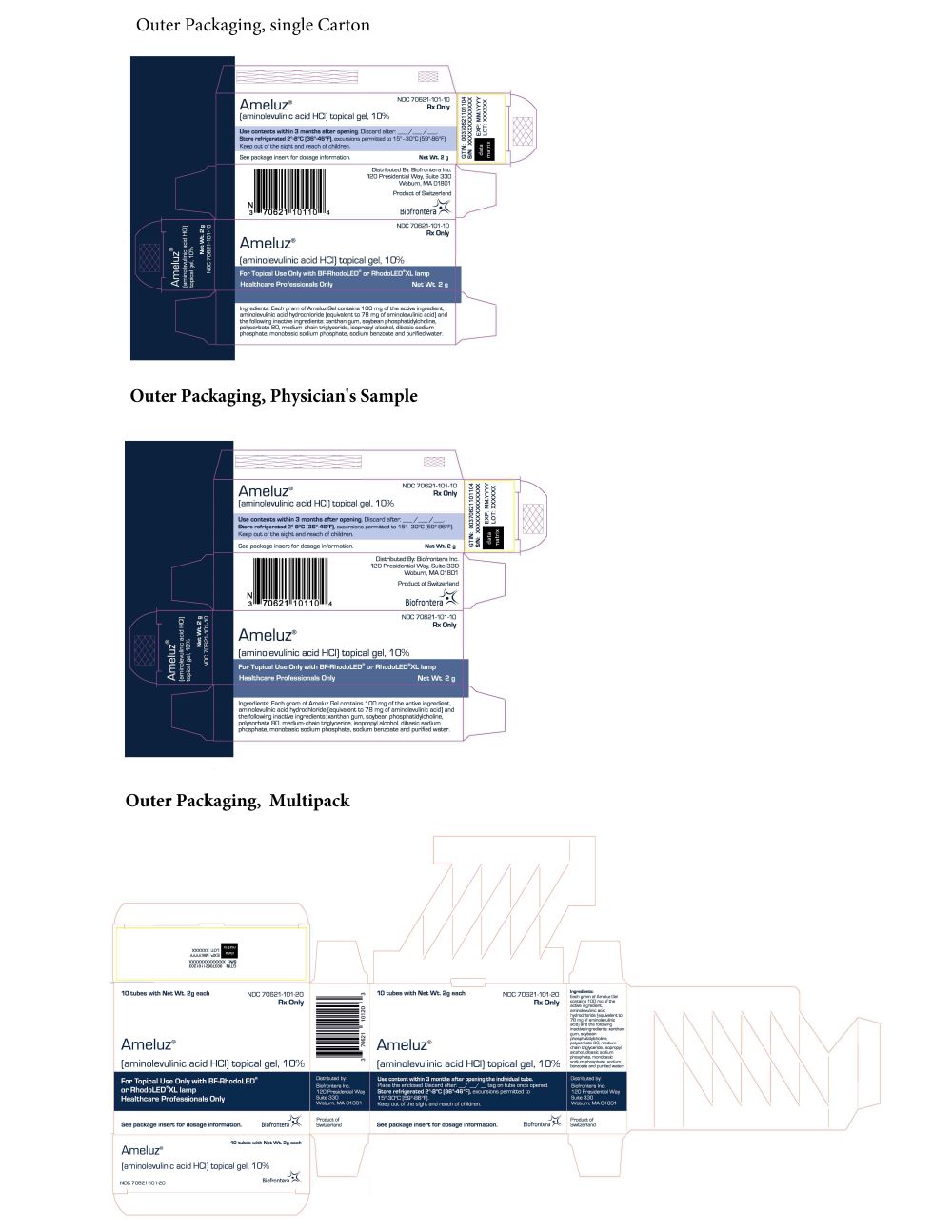
    11PRINCIPAL DISPLAY PANEL – OUTER PACKAGING
    figure6
    Outer Packaging, single Carton
    NDC 70621-101-10
    Ameluz
    (aminolevulinic acid HCl) topical gel, 10%
    Use contents within 3 months after opening. Discard after: __/ __/ __.
    Store refrigerated 2°-8°C (36°-46°F), excursions permitted to 15°-30°C (59°-86°F).
    Keep out of the sight and reach of children.
    See package insert for dosage information. Net Wt. 2 g
    Distributed By: Biofrontera Inc.
    660 Main Street, 1st Floor
    Woburn, MA 01801
    Product of Switzerland
    For Topical Use Only with BF-RhodoLED
    Healthcare Professionals Only
    Ingredients: Each gram of Ameluz Gel contains 100 mg of the active ingredient, aminolevulinic acid hydrochloride (equivalent to 78 mg of aminolevulinic acid) and the following inactive ingredients: xanthan gum, soybean phosphatidylcholine, polysorbate 80, medium-chain triglyceride, isopropyl alcohol, dibasic sodium phosphate, monobasic sodium phosphate, sodium benzoate and purified water
    Outer Packaging, Physician's Sample
    NDC 70621-101-30
    Ameluz
    Physician's Sample
    Not for sale
    (aminolevulinic acid HCl) topical gel, 10%
    Use contents within 3 months after opening. Discard after: __/ __/ __.
    Store refrigerated 2°-8°C (36°-46°F), excursions permitted to 15°-30°C (59°-86°F).
    Keep out of the sight and reach of children.
    See package insert for dosage information. Net Wt. 2 g
    Distributed By: Biofrontera Inc.
    660 Main Street, 1st Floor
    Woburn, MA 01801
    Product of Switzerland
    For Topical Use Only with BF-RhodoLED
    Healthcare Professionals Only
    Ingredients: Each gram of Ameluz Gel contains 100 mg of the active ingredient, aminolevulinic acid hydrochloride (equivalent to 78 mg of aminolevulinic acid) and the following inactive ingredients: xanthan gum, soybean phosphatidylcholine, polysorbate 80, medium-chain triglyceride, isopropyl alcohol, dibasic sodium phosphate, monobasic sodium phosphate, sodium benzoate and purified water

    Outer Packaging, Multipack
    10 tubes with Net Wt. 2g each NDC 70621-101-20
    Ameluz
    (aminolevulinic acid HCl) topical gel, 10%
    For Topical Use Only with BF-RhodoLED
    Healthcare Professionals Only
    See package insert for dosage information.
    Distributed By: Biofrontera Inc.
    660 Main Street, 1st Floor
    Woburn, MA 01801
    Product of Switzerland
    10 tubes with Net Wt. 2g each NDC 70621-101-20
    Ameluz
    (aminolevulinic acid HCl) topical gel, 10%
    Use contents within 3 months after opening the individual tube.
    Place the enclosed Discard after: __/ __/ __.tag on tube once opened.
    Store refrigerated 2°-8°C (36°-46°F), excursions permitted to 15°-30°C (59°-86°F).
    Keep out of the sight and reach of children.
    See package insert for dosage information.
    Ingredients:
    Distributed By: Biofrontera Inc.
    660 Main Street, 1st Floor
    Woburn, MA 01801
    Product of Switzerland
    Ameluz has been selected.